Task to task blocking
If an issue is blocked by another issue (FtS/FtF/StS/StF), then we should not be able to close the blocked task until the blocked by task is closed. The start date or the completion date of the blocked task will depend on the start date and the completion date of the blocking task.
Seamlessly link tasks to reflect real-world dependencies between them. When one task depends on another, the system enforces blocking rules to ensure proper sequencing.
If these conditions aren’t met, you’ll be notified with a conflict message, and actions like moving a task to In Progress or Done will be restricted.
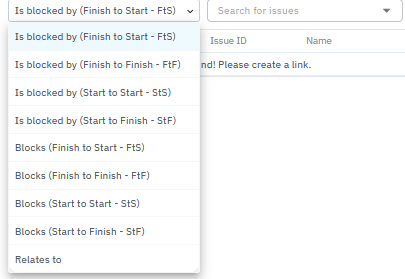
Types of Task Dependencies:
1. Finish to Start (FtS) – “Start after completion”
Example Use: Task B can’t start until Task A is complete (e.g., deployment begins only after testing ends).
Blocked Task: Task B
Blocker Task: Task A
Rule: Task B’s start date cannot be earlier than Task A’s end date.
UI Behavior: Task B can only move to In Progress once Task A reaches the Done column.
If you try to revert Task A while Task B is already in progress, you’ll receive a conflict warning until Task B is also moved back.
2. Finish to Finish (FtF) – “Complete together”
Example Use: Task B can’t finish until Task A is finished (e.g., bug fix task can’t be closed until code review ends).
Blocked Task: Task B
Blocker Task: Task A
Rule: Task B’s end date cannot be earlier than Task A’s end date.
UI Behavior: Task B can only move to Done when Task A is already in Done.
Trying to mark Task A undone while Task B is already done will show a dependency error.
3. Start to Start (StS) – “Start in sync”
Example Use: Tasks need to begin at the same time (e.g., launching a landing page and sending out an announcement email).
Blocked Task: Task B
Blocker Task: Task A
Rule: Task B’s start date cannot be earlier than Task A’s start date.
UI Behavior: Task B can only move to In Progress if Task A is also in In Progress.
If Task A is moved back to To Do, Task B must be too.
4. Start to Finish (StF) – “Cannot finish until the next task starts”
Example Use (Field Services): Technician A cannot log off (end Task A) until Technician B has logged in (started Task B) to maintain 24x7 coverage.
Blocked Task: Task A
Blocker Task: Task B
Rule: Task A’s end date cannot be earlier than Task B’s start date.
UI Behavior: Task A can only be marked Done if Task B has at least started (In Progress).
You cannot move Task B back to To Do unless Task A is also undone.
Note:
You cannot move a blocked task forward (e.g., to In Progress or Done) if the blocking task hasn’t reached its required state. Similarly, reverting a blocking task will trigger a conflict warning if dependent tasks aren’t reset first.
Was this article helpful?
That’s Great!
Thank you for your feedback
Sorry! We couldn't be helpful
Thank you for your feedback
Feedback sent
We appreciate your effort and will try to fix the article