How to add Tasks in Task

Created by TeamTrace Support, Modified on Tue, 5 Aug, 2025 at 5:36 AM by TeamTrace Support

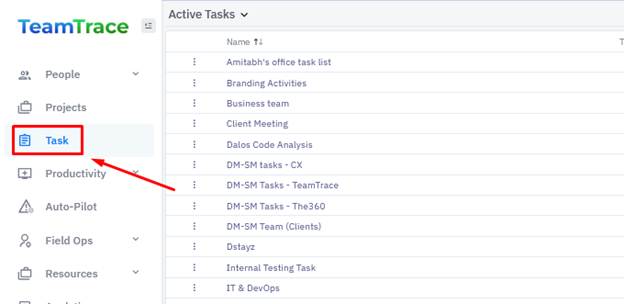
From the left panel on the Dashboard, click on Task.
A screenshot of a computer

AI-generated content may be incorrect.


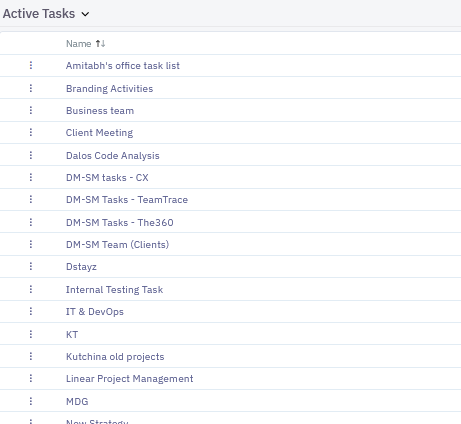
From the Task list click on the Task you want to create the task in.
A screenshot of a computer

AI-generated content may be incorrect.


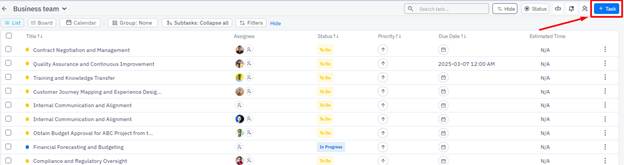
From the Task list, click on the + Task button in the top right corner of the page.
A screenshot of a computer

AI-generated content may be incorrect.


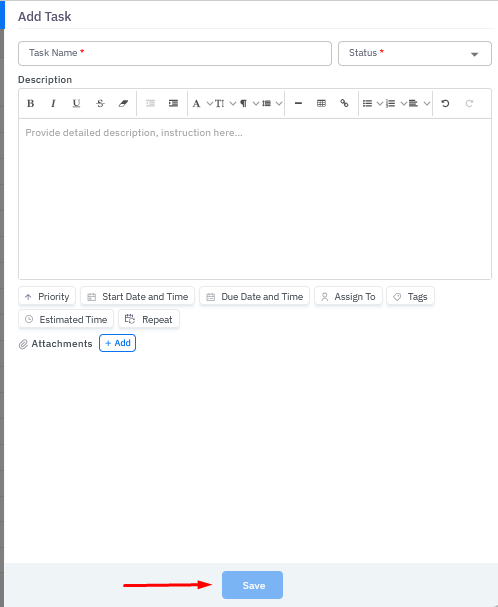
Fill in the required details and click on the Save button to add the task.
A screenshot of a computer

AI-generated content may be incorrect.


Was this article helpful?

That’s Great!

Thank you for your feedback

Sorry! We couldn't be helpful

Thank you for your feedback

Let us know how can we improve this article!

Select at least one of the reasons
CAPTCHA verification is required.

Feedback sent

We appreciate your effort and will try to fix the article