A Sprint is a short, time-boxed period in Agile and Scrum methodologies during which a team works to complete a defined set of work. The typical Sprint duration ranges from 1 to 4 weeks, with 2 weeks being the most common.
The goal of a Sprint is to deliver a potentially shippable product increment—something valuable and usable.
In TeamTrace, Sprints are part of the Scrum project template. If you wish to create a Sprint, you'll first need to create a project using the Scrum methodology.
Create a Scrum Project
Navigate to Project from the left-hand menu.
Click on Add Project.
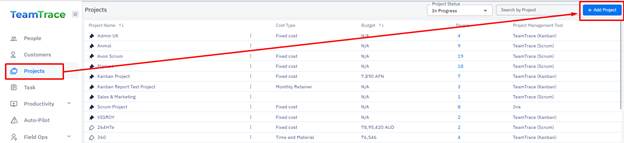
In the Add Project menu:
Fill in the required project details (e.g., name, description).
Select Scrum as the Project Template.
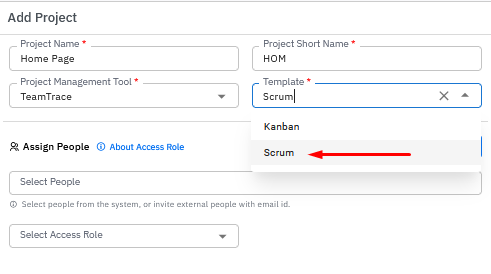
Click the Add Project button at the bottom of the form. |
|

After creating the project, click on the project name to open the Project Dashboard.
Add a Sprint
On the top right of the dashboard, click the Quick Add button.
Select Add Sprint from the dropdown menu.
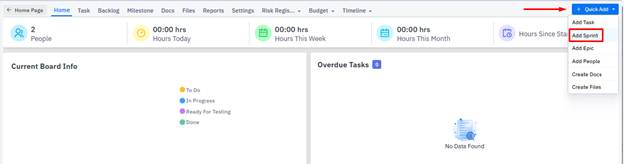
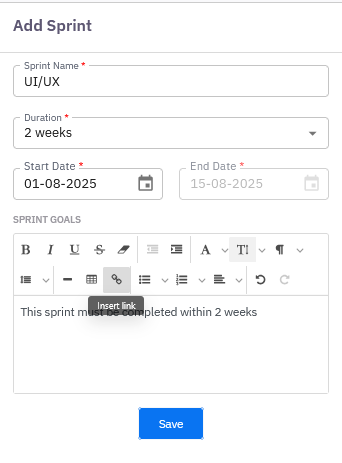
In the Add Sprint window:
Enter the required Sprint details such as name, goal, duration, and dates.
Click Save.
Manage Your Sprint
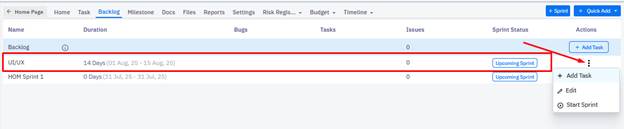
Once the Sprint is created, it will appear under the Backlog section.
From the three-dot menu (ellipsis) next to the Sprint name, you can:
Add a Task
Edit Sprint details
Start the Sprint
Was this article helpful?
That’s Great!
Thank you for your feedback
Sorry! We couldn't be helpful
Thank you for your feedback
Feedback sent
We appreciate your effort and will try to fix the article