Overview
TeamTrace uses roles and permissions to control what users can access and what actions they can perform.
Assigning the correct role helps ensure that users only have access to the features and information they need for their work.
For example:
An Administrator may need access to organization settings and user management.
A Manager may need access to projects, tasks, and team information.
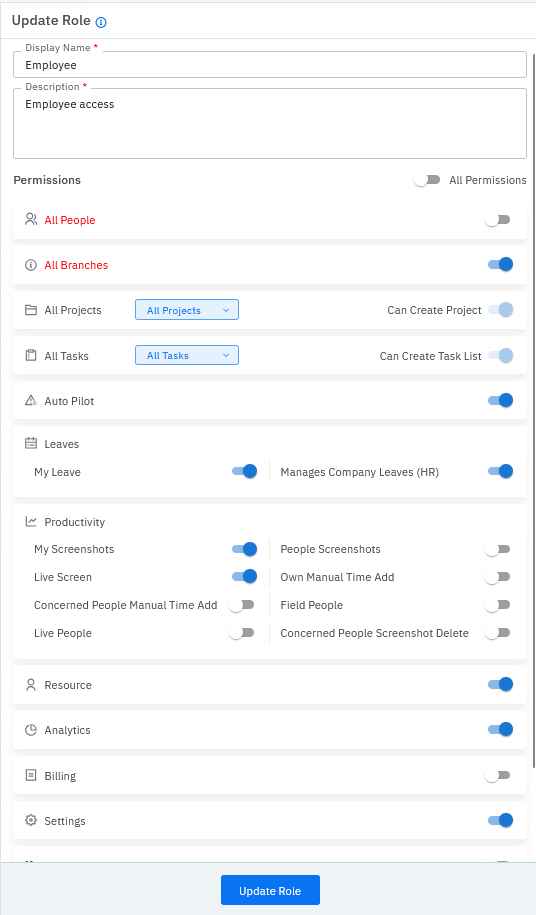
An Employee may primarily need access to their own work, attendance, timesheets, and assigned tasks.
Important: The exact permissions available to a user depend on the role and configuration assigned to them.
What Is a Role?
A role is a predefined set of permissions assigned to a user.
Instead of managing every permission individually, administrators can assign an appropriate role based on the user's responsibilities.
Example
If a user needs to manage projects but should not have access to organization-level administration, assign a role that provides the required project access without giving unnecessary administrative permissions.
What Is a Permission?
A permission determines what a user can do or access in TeamTrace.
Depending on the user's role, permissions may control access to areas such as:
Users and employees
Projects
Tasks
Timesheets
Attendance
Reports
Settings
Other organization features
A user's role therefore determines the level of access available to them.
Why Are Roles and Permissions Important?
Using roles and permissions correctly helps organizations:
1. Protect Information
Users only receive access to the information they need.
2. Prevent Unwanted Changes
Administrative or configuration options can be restricted to authorized users.
3. Simplify User Management
Administrators can assign an appropriate role instead of configuring access for every user individually.
4. Maintain Better Control
Organizations can clearly define who can manage users, projects, reports, and other TeamTrace functions.
Administrator Access
An administrator generally has the highest level of access within the organization.
Administrative responsibilities may include:
Managing users
Managing organization settings
Configuring access
Managing projects
Viewing reports
Managing other TeamTrace settings
Administrator access should only be provided to users who need it.
Best Practice: Do not assign administrative access simply because a user needs access to a particular project or report.
Manager Access
Managers typically need access to manage work performed by their teams.
Depending on the permissions assigned, a manager may need access to:
Projects
Tasks
Team members
Timesheets
Attendance
Reports
Project-related information
The exact access should be based on the manager's responsibilities.
Employee/User Access
Employees generally use TeamTrace to perform and track their day-to-day work.
Depending on the organization's configuration, employees may have access to:
Their assigned projects
Tasks
Time tracking
Attendance
Timesheets
Activity information
Other features required for their work
Employees should normally not be given administrative permissions unless required.
External User Access
An external user is typically a client or other external stakeholder who needs visibility into a specific project.
External users are added from within the project:
Project → Settings → People → Add People
When adding an external user, the administrator provides the user's email address and assigns the required access role.
The external user receives an email after being added.
Important: External users should only be given the access required for the project or information they need to view.
Quick Reference
Role = Defines the user's level/type of access.
Permission = Defines what the user can access or do.
Administrator = Organization-level management.
Manager = Management of work, teams, projects, or related functions based on assigned permissions.
Employee/User = Day-to-day work and tracking.
External User = Client or external stakeholder with access to a specific project.
Was this article helpful?
That’s Great!
Thank you for your feedback
Sorry! We couldn't be helpful
Thank you for your feedback
Feedback sent
We appreciate your effort and will try to fix the article